

There are more thread downloader tools available now than ever before. Most of them work some of the time. Fewer of them work consistently, without friction, and without giving you a result you didn’t ask for. The difference isn’t always obvious until you’re already frustrated.
This is an honest look at what actually works in 2026 — and more usefully, what doesn’t and why.
What Works — The Short List
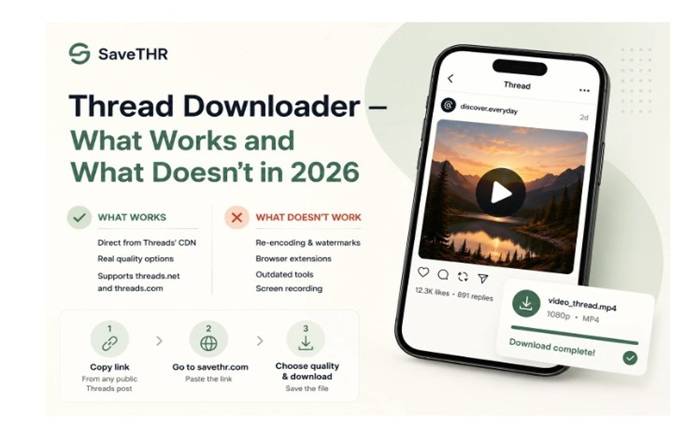
Browser-based tools that fetch directly from Threads’ CDN. These are the most reliable category. You paste a post URL, the tool resolves the video file from Meta’s content delivery network, and your browser downloads it directly. No re-encoding, no quality loss, no watermark from the tool. The file you get is the original.
Tools that have kept up with Threads’ URL changes. Threads migrated from threads.net to threads.com in 2025. Tools that were updated to handle both formats work seamlessly — you can paste any Threads link regardless of when it was created. Tools that weren’t updated struggle with newer links and often return errors that seem unrelated to the actual problem.
Tools that show real quality options. If a downloader shows you 720p and 1080p as separate choices, it’s retrieving the actual variants Meta has for that video. These reflect what was really uploaded and let you make a meaningful choice about what you download.
What Doesn’t Work — And Why
Tools that re-encode the video before delivering it. Re-encoding means the tool downloads the video, processes it on its own servers, and sends you the processed version. This degrades quality slightly and opens the door for adding watermarks. The giveaway is a logo in the corner of the output or a single quality option regardless of the source material.
Tools built around browser extensions. Extensions that promise to add a download button to Threads can be tempting, but they come with a significant trade-off. Browser extensions typically request permission to read and modify everything you do in your browser — all tabs, all sites. That’s a broad permission to grant something you found while looking for a video downloader. Tools that work in a plain browser tab without any extension are cleaner and safer.
Tools that haven’t been maintained. The thread downloader space sees a lot of tools launched and then abandoned. An unmaintained tool breaks over time as Threads updates its infrastructure, URL formats, and API behavior. The symptom is usually errors on links that look correct, or downloads that start but fail partway through.
Screen recording. Not technically a downloader, but often attempted as an alternative. It always produces lower quality than the original, captures the app’s interface elements (username overlay, buttons), and can accidentally include notifications. It’s the worst option from a quality standpoint.
The Scenarios That Confuse People Most
“The link works in the Threads app but returns an error in the downloader.” Almost always a private account. The content is accessible to you because you follow the account or are logged in. The downloader doesn’t have your login and sees a private post it can’t access. Check the profile — if it says Private account or shows a lock icon, that’s the cause.
“It worked last month but doesn’t work now.” Either the tool hasn’t been updated to handle Threads’ current infrastructure, or the specific post was deleted. Try a different tool to isolate whether it’s the tool or the post.
“I downloaded it but can’t find the file.” On Android, the file is in your Downloads folder — your gallery should pick it up automatically, but if it doesn’t, open your file manager and tap the file once to trigger the scan. On iPhone, check whether you tapped Save Video or Save to Files when the prompt appeared. If you chose Save to Files, the video is in the Files app, not in Photos.
“The quality looks worse than what I watched in the app.” Usually means a lower resolution option was selected. Some tools default to 720p even when 1080p is available. Check the quality options and make sure you’re selecting the highest one. If 1080p isn’t available, it likely wasn’t uploaded at that resolution to begin with.
What a Good Thread Downloader Looks Like in Practice
You paste a link. The tool processes it in a few seconds. You see quality options that reflect the actual content — 720p and 1080p for most videos, sometimes less for older content. You pick the quality you want, tap download, and the file arrives on your device without anything added to it.
That’s the full interaction. No redirect pages, no fake countdown timers, no ads positioned directly over the download button, no watermark on the output. If any of those things are happening, the tool is optimizing for something other than your experience.
How to Use One That Works — 3 Steps
Step 1 — Copy the link from Threads
Tap the three-dot icon on any public post and select Copy link. On desktop, copy the URL from the address bar.
Step 2 — Open savethr.com and paste the link
Open your browser and go to savethr.com. As a thread downloader it fetches files directly from Threads’ CDN, handles both the old threads.net and new threads.com URL formats, and shows actual quality options based on what was uploaded.
Step 3 — Choose quality and save
Select the highest resolution available and download. savethr.com works on Android, iPhone, and desktop — no extension, no installation, no account required. The file goes to your Downloads folder on Android, to Photos on iPhone if you tap Save Video, and to your downloads folder on desktop.
One Consistent Limitation Across All Tools
No thread downloader — including the best ones — can access private accounts. This is by design. Private content is behind authentication, and a downloader doesn’t have your login credentials. It’s not something that will change; it’s a fundamental aspect of how Threads’ access control works.
Similarly, no tool can retrieve deleted posts. Once a post is gone from Threads’ servers, the link is dead. There’s no cache or archive that a downloader can pull from.
The Short Version
In 2026, the thread downloader tools that work reliably are browser-based, fetch files directly from Threads’ CDN, support both URL formats, and show real quality options. The ones that don’t work either re-encode (adding quality loss and watermarks), haven’t been updated since Threads changed its URL structure, or rely on browser extensions with overbroad permissions. savethr.com fits the working category — paste a public Threads link, pick your quality, download. No watermark, no extension, no account needed.